
QR Code Analytics That Track Every Scan
Turn a printed code into a measurable channel. Every QR code you make on MetricQR is dynamic and tracked, so you can see how many scans you got, where they came from, what time they happened, and which devices people used — free, with unlimited codes and unlimited scans.
No credit card. No scan limits. IP addresses are never stored.
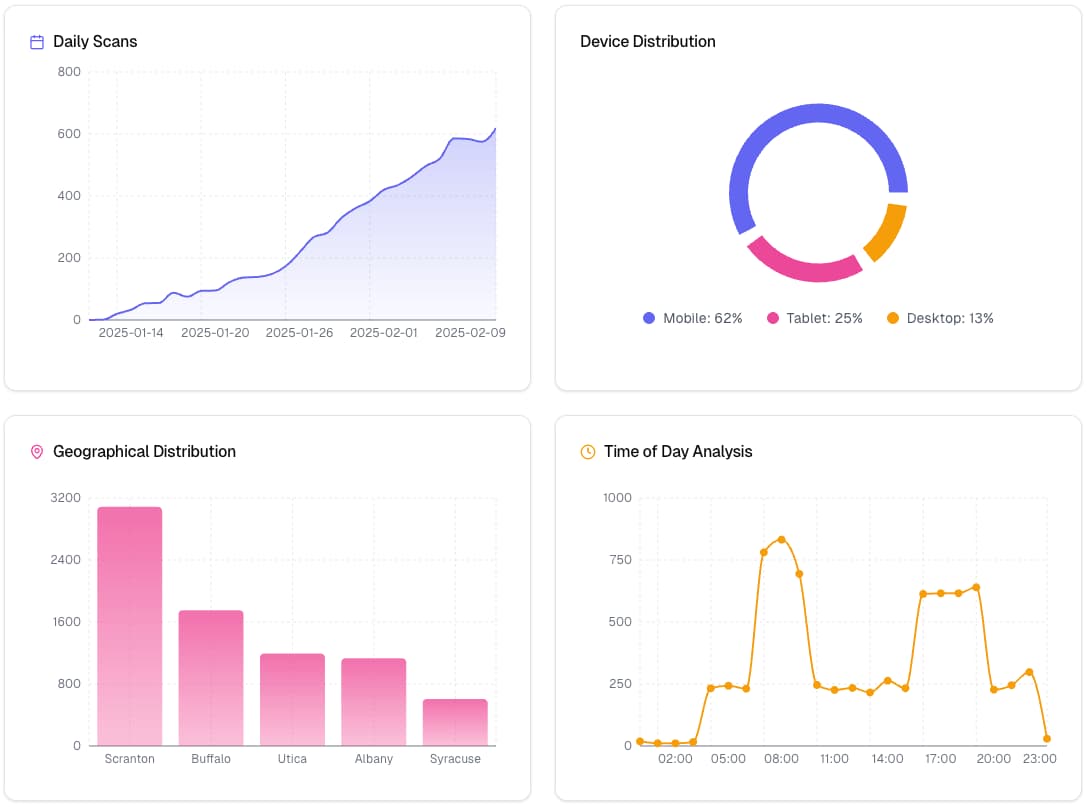
What Your QR Code Analytics Dashboard Shows
Every tracked code comes with a built-in QR code tracker and its own dashboard, and the same views roll up across your whole account or organization. Pick any date range and the charts, stats and scan log update together.
Scans Over Time
A daily time series of scan counts, bucketed to your own time zone, so a campaign that launched on Tuesday reads as Tuesday.
Geographic Distribution
Scans broken down by city and country. Useful for working out which printed placements actually get used.
Time-of-Day Patterns
An hourly distribution showing when scanning peaks — the fastest way to spot lunchtime table traffic or a post-event spike.
Device, OS & Browser
Which devices, operating systems and browsers your audience scans with, so you can check the landing page against what they are really holding.
Individual Scan Log
An event-by-event list of every scan with its timestamp, location, device and where it was redirected to — filterable and searchable.
CSV & PDF ReportingPro
Export the raw scan events as CSV for your own analysis, or generate a formatted PDF report with the charts already laid out.
Essential QR Code Metrics to Track
Not every number is worth watching. These are the QR code stats that actually change decisions, and what each one is good for.
Total Scans
Your headline volume figure, and the baseline every other metric is read against. On its own it tells you very little — a number is only meaningful next to the placement, the date range and the print run it came from.
Scan Rate Over Time
The shape of the curve matters more than the total. A sharp spike that decays within days is normal for events; a flat line on evergreen signage usually means the placement is being walked past.
Geographic Distribution
Where scans physically happen, at city and country level. When you run the same design in several locations, this is what tells you which venue, city or region is carrying the campaign.
Time Patterns
Peak hours and days. Restaurants see meal-time clusters, retail sees weekend weighting, and B2B print sees office hours — and each implies a different moment to update the destination.
Device Analytics
The device, OS and browser mix behind your scans. A heavily iOS-weighted audience is a reason to test the landing page in Safari before spending anything on the next print run.
Scans per Placement
Give each poster, table tent or flyer variant its own QR code and the comparison becomes direct. This is the single most useful habit in QR analytics, and it costs nothing.
How QR Code Analytics Tracking Works
Dynamic QR Code Creation
Your code encodes a short link on our domain — or your own branded domain — instead of the destination URL, which is what makes it both trackable and editable after printing.
Data Capture
A scan hits that short link. We resolve any targeting, expiry or password rules attached to the code and immediately redirect the visitor onward.
Background Processing
After the redirect is sent, a background worker derives the approximate location and parses the device string, then writes the scan record and updates the counter.
Seamless Experience
The person scanning sees their destination and nothing else. The enrichment work never sits between them and the page they asked for.
QR Code Reporting & Data Export
Dashboards are for you; reports are for everyone else. On the Pro plan any date range can leave MetricQR in two forms, so the QR code statistics you rely on are not trapped behind a login. Reading and filtering the same data in the dashboard is free.
CSV Export
One row per scan, with date, time, city, country, device, browser, OS, referrer, destination and redirect reason — ready for a spreadsheet or your own warehouse.
PDF Report
A formatted document with the charts, totals and top cities and countries already laid out — the version to send to a client or manager.
A note on referrers
Almost every QR scan reports its source as “direct”, because phone camera apps send no referrer header. That is true of every QR analytics product, not just this one.
It is why our reporting leads with time, location and device rather than traffic source. If you need campaign attribution, attach UTM parameters to the destination and read them in your web analytics.
Privacy-First QR Code Tracking
Scan tracking does not have to mean surveillance. The IP address of a scan is used in memory to derive an approximate city, region and country, and is then discarded — it is never written to the database.
There is no cross-site tracking, no advertising identifier and no attempt to follow an individual between scans. What you get is aggregate behaviour, which is what campaign decisions actually need.
- IP addresses are never stored
- Location kept at city, region and country level
- Device data limited to OS and browser family
- No advertising or cross-site identifiers
- Scan data deleted with the code that owns it
QR Code Analytics Tools Comparison
| Feature | MetricQR | Basic Tools | Enterprise Solutions |
|---|---|---|---|
| Scan tracking | Limited | ||
| Geographic analytics | Basic | ||
| Device analytics | No | ||
| CSV & PDF export | On Pro | Rarely | |
| Scan history retention | Unlimited, on every plan | Often 30 days | Windowed by tier |
| UTM campaign parameters | On Pro | Rarely | |
| Targeting by device, OS & country | On Pro | No | |
| Custom branded domain | On Pro | No | |
| Team workspaces | On Pro, up to 100 | No | Per seat |
| Scan limits | Unlimited | Capped | Unlimited |
| Cost | Free, or one flat Pro plan | Free - $10/mo | $100+ /mo, per seat |
What Pro adds beyond the dashboard
The table above covers analytics features specifically. Pro is a single flat plan rather than a tiered enterprise contract, and it includes a good deal that a comparison table has no room for:
Measurement & campaigns
- UTM parameters for campaign tracking
- Dynamic scan parameters (device, location, time)
- Analytics export as CSV & PDF reports
- Smart labels to organize and filter codes
Routing & control
- Targeting by device, OS, country & language
- Branded short URLs with custom slugs
- Custom branded domain (qr.yourbrand.com)
- Password-protected QR codes
- Auto-expiry by date or scan count, with fallback URLs
- Scheduling within a start and end window
Teams & brand
- Team workspaces for up to 100 members
- Lead capture forms before scanners reach content
- Reusable brand templates for your designs
Frequently Asked Questions About QR Code Analytics
What is QR code analytics?
QR code analytics is the practice of measuring what happens after someone scans your code. A dynamic QR code points at a short redirect link rather than your final URL, so every scan passes through a tracking step before the visitor lands on the destination. That step records when the scan happened, roughly where it came from, and what kind of device was used — turning a printed code into a measurable marketing channel.
Can I get QR code analytics for free?
Yes. Every QR code on MetricQR is dynamic and tracked on the free plan, with unlimited codes and unlimited scans. Scan statistics, the geographic and device breakdowns, the time-of-day chart and the full scan log are all included at no cost. Pro adds CSV and PDF export plus per-code features such as custom slugs, UTM parameters, expiry rules, password protection, and geo/device targeting.
What is the difference between static and dynamic QR codes for analytics?
A static QR code encodes your destination URL directly, so scans never touch a server you control and cannot be counted. A dynamic QR code encodes a short tracking link instead, which means every scan can be recorded and the destination can be changed later without reprinting the code. All trackable codes on MetricQR are dynamic.
Does QR code tracking slow down the scan?
The redirect is a single hop: the short link resolves and sends the visitor straight to the destination, and the analytics record is written by a background worker after the redirect has already been issued. Enriching the scan with location and device data happens off the critical path, so it does not delay the person scanning.
Do you store the IP addresses of people who scan my QR codes?
No. The IP address is used in memory to derive an approximate city, region, and country, and is then discarded — it is never written to the database. What is stored is the derived location, the device, OS and browser family, and the timestamp. There is no cross-site tracking and no advertising identifier.
How accurate is the location data?
Location is derived from the network address using a special database, so it is approximate. City-level accuracy is generally reliable for fixed broadband and weaker on mobile networks, where the result may reflect the carrier gateway rather than the person. Country-level data is the most dependable, and mobile users on a VPN will show the VPN exit location.
Can I export my QR code statistics?
Yes, on the Pro plan. Any date range can be exported as a CSV of individual scan events with date, time, city, country, device, browser, OS, referrer, destination and redirect reason. Pro also generates a formatted PDF report containing the charts and summary figures, which is the easier one to hand to a client or manager. Viewing and filtering the same data in the dashboard is free.
How long do you keep my QR code scan history?
Indefinitely. There is no retention window and no tier that shortens it — a code you printed three years ago still has every scan it ever received, on the free plan as much as on Pro. This is worth checking wherever you end up, because retention is commonly metered elsewhere: it is normal to see scan history capped at 30 days on an entry plan and a year further up. Your scan data is deleted only when you delete the QR code that owns it, or reset its scans yourself.
Why does almost every scan show its source as direct?
Because most QR codes are scanned with a phone camera, and a camera app sends no referrer header. This is normal and is true of every QR analytics tool. It is the reason we base reporting on time, location and device rather than traffic source — if you need campaign attribution, add UTM parameters to the destination and read them in your web analytics.
Want the long version?
Our complete guide covers analytics strategy in depth — campaign benchmarking, industry use cases, common measurement mistakes, and how to read the numbers once they start coming in.
Start Tracking Your QR Codes Today
Make a code, print it, and watch the scans arrive. The dashboard, the charts and the scan log are all on the free plan — unlimited codes, unlimited scans, full analytics.
- Monitor scan performance in real time
- Identify peak engagement times and locations
- Compare placements with one code each
- Export statistics as CSV or PDF on Pro
- Edit the destination without reprinting